This is the layout I taught at Studio J Boot Camp!

Watch my tutorials to learn these techniques or schedule a one-on-one Studio J session with me.

There are so many benefits to memory keeping the Studio J way!

I love that Studio J allows us unlimited My Stickease and embellishments. We can even resize them...can't do that with our classic supplies.

Use Studio J to create hybrid pages.

Let me show you how to dress up a Studio J page with a little bling! I added Bitty Sparkles to this page.

Let your creativity shine with Studio J!

Take my face-to-face classes or watch my video tutorials to learn advanced Studio J techniques such as creating your own background paper using text boxes.

Studio J is your best friend if you are short on time.

Drop in your photos, color the toggle accents, add a title and journaling, print...it really is that easy! Let me show you how.

Showing posts with label Star Trek. Show all posts

Saturday, March 3, 2012

Gearing Up for Emerald City Comicon 2012


I'm the first to admit that I'm a big geek and one of my passions is Star Trek.  I attend as many conventions as possible and am determined to get my photo taken with all my favorite actors.  As you may imagine, I have a LOT of scrapbook pages devoted to Star Trek; so much so that my friends call me a techno-scrapper!    


I was inspired to create this layout because the 2012 Emerald City Comicon is one month from today, and, yes, I already have my ticket.  I took these photos of Jonathan Frakes & Brent Spiner at last year's ECCC. The Superhero paper is a perfect fit for Comicon, and I matted all my photos with white daisy cardstock to mimic the look of comic frames. I used the Showtime pattern from Magic and swapped the pages to create the EC*Comicon 2011 title.

 It has been awhile since I embossed anything, so I pulled out the craft heater, black embossing powder, and the Hero Alphabet to create my title.  I also used the Art Philosophy cartridge and Dimensional Elements Numbers to create the date.  I really appreciate that CTMH prints the size to set the Cricut directly on the packaging for the dimensional elements (and stamp sets).  It makes it so easy to cut the perfect size every time!


I popped up the photos and journaling block and wrapped our new Baker's Twine around them...I love this stuff! I had fun finishing off the look with a couple of the Comic Badge Buttons.

I'm applying to teach at Convention this year, and I almost didn't want to send this layout because I wanted to keep looking at it.  I will get it back, but, if I don't get selected, I won't see it again until July!  I wish these photos were better.  Oh well.
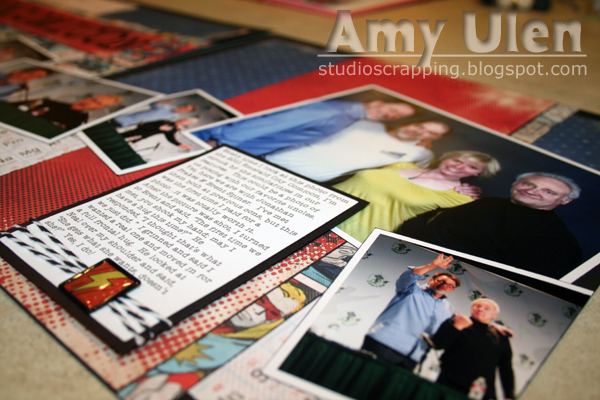

Here is my journaling:

"Every time I look at this photo from the 2011 Emerald City Comicon, I’m struck by the similarities in our features.  This could be a photo of us posing with our favorite uncles.  Yet, here we are with Jonathan Frakes & Brent Spiner.  I’ve met them both at previous cons, but this was the first time I paid for a photoit was totally worth it.  After the picture was shot, I turned to Brent and said, “The first time we met, you shook my hand; may I have a hug this time?”  He responded, “I thought that’s what we just did.”  I grinned and said I wanted a real one and moved in for a full frontal hug.  He looked at Neal over my shoulder and said, “She gets what she wants, doesn’t she?”  Yes, I do!"

Seriously, doesn't it look like they could be our uncles?!

Tuesday, November 29, 2011

Why I'm Thankful for Studio J #29--Warning Symbols

I'm thankful that Studio J gives me warning symbols when I'm using low quality photos.  When I try to resize a photo that doesn't have a high resolution, Studio J pops up the yellow warning sign.  I'm even more thankful for the fact that I can simply ignore the warnings and that they won't print on my final layout.  Sometimes I don't mind having a blurry photo on my page because it tells a story.  In this example, the images on the right were a screen capture from a TV station aired over the Internet...it's not surprising that the quality is low.  Yet, I'm still going to use the photos, because it is a record of my brief experience on Star Trek: Enterprise!

Don’t forget to leave a comment on the giveaway blog post to have a chance at winning a FREE Studio J 5-Pack (includes 5 layouts, page protectors, and shipping).  With only 1 day left, your chances are really good as there are only 19 comments on that post, so hurry up and click on over there!

Tuesday, July 26, 2011

A Big Thank You & Celebration

I haven't posted for a couple weeks, but now I'm back with a huge thank you to all of you who voted for my Super Stars layout.  I won 2nd place in Close To My Heart's Studio J Free-for-All contest!  You know what that means?  I'm passing my winnings on to you!  Visit my blog and Facebook page often as  you never know when I may have a 5-pack or two to give away.

Although I was disappointed in missing convention this year, there is so much to celebrate.  I had an amazing time in Hawaii and am counting down the days until the new kits are released on Studio J so that I can scrapbook my photos.  While at convention, CTMH consultants were able to celebrate the announcement that CTMH now has a Cricut cartridge!  Well, as I had not spent all that extra money at convention, I figured this was the perfect time for me to get a Cricut, too!  So, all's well that ends well.  Here is a little video to whet your appetite.  If you would like more information about our Cricut package, please free to contact me.

Monday, June 13, 2011

My Free JPG Image

I'm so excited about this layout!  I can't wait to get the actual prints, because I'm going to add lots of Bitty Sparkles to add texture and continue the space theme.  These photos were taken at the Star Trek 40th Anniversary Convention in Seattle.  (Kit:  Stardust ~ Pattern:  Front & Center ~ Kit Mix 3 ~ Techniques:  rotated right page, changed color of patterned paper to black, converted photo well to journaling area & title area to photo well, modified title & focal photo in Photoshop, added text boxes filled with pattern paper & cardstock to create Star Trek design, minimal embellishments since I plan to add bling later!)

Don't forget that you can get your own FREE JPG today!  I hope you'll enter it into my contest, too.

Related Posts Plugin for WordPress, Blogger...
Twitter Delicious Facebook Digg Stumbleupon Favorites More